 |
SCSI |
|---|
SCSI is one of the oldest and most evolved standard interfaces still in use. Originally developed by Shugart Associates in 1979, the standard spawned multiple revisions of ANSI standards: SCSI-1, SCSI-2, and SCSI-3, each with significant performance enhancements. (ANSI is the standards organization that rules these things. They move slowly, but like a glacier, they also have tremendous force.)
A useful but confusing aspect of the standards is the fact that although each revision defines new features and performance levels, many of these features are optional. Thus, two drive or controller manufacturers may elect to support different subsets of the features of a standard, and both can still call their products compliant to the same standard. To differentiate their products from each other, the manufacturers' marketing folks invented a bunch of "marketing names" for certain common subsets of the standard features. And of course, these names rapidly supplanted the standard names in common usage.
The end result was a proliferation of similar-but-different names which can be damn near impossible to sort out. So, we will place all the SCSI cards on the table for you, and help make sense of it.
First, we'll briefly define the three real ANSI standards, a bunch of the terminology and acronyms, and the dozen most common marketing names. Then we'll tell you the important stuff — the drives and controllers that Glyph sells, and why we think these are the right ones for you.
Standard: SCSI-1
This is the original SCSI standard. It defines an 8-bit (1 byte = "Narrow") data path, and a maximum data clocking speed of 5 MHz, thus a maximum data transfer rate of 5 MByte/sec (5 MHz x 1 byte). SCSI-1 uses 5-Volt ("HV") single-ended ("SE") or differential ("HVD" or "DIFF") signalling. It requires HVD termination for HVD, and either passive or active for SE. SCSI-1 permits up to 8 devices on the bus, one of which must be the controller. Each device is assigned a unique "ID" number; typically the controller is device ID 7.The SCSI-1 standard is obsolete, and was withdrawn some time ago by ANSI. Old SCSI-1 devices can still be used, of course, and they can be run on faster/wider busses, with some restrictions; but their presence will degrade the operational characteristics of the bus (i.e. slow it down).
Standard: SCSI-2
The SCSI-2 standard dates from about 1985. It improves performance and reliability, and adds capabilities that SCSI-1 didn't have. The standard itself was formally approved by ANSI in 1994; it's called "X3.131-1994".SCSI-2 doubles the maximum bus speed from 5 MHz to 10 MHz ("Fast"), and doubles the data width from 8 bits to 16 bits (2 bytes = "Wide"). Running at 10 MHz and 16-bit width ("Fast/Wide") allows data transfer rates up to 20 MB/sec. SCSI-2 also permits more devices on the bus (16), defines active termination for higher data reliability, and defines "differential" voltage signals at 5V ("HVD"). Software-wise, it supports command queuing and expanded command sets to support optical and removable media.
Back-compatibility with SCSI-1 devices was maintained fairly well -- in general, older SCSI-1 devices will operate on a SCSI-2 bus, of course at the SCSI-1 performance level. Their presence on the bus makes the entire bus run at the reduced performance, and any faster or wider SCSI-2 devices on it also are forced back into SCSI-1 operation.
Standard: SCSI-3
The SCSI-3 standard has been worked on since about 1993. It's actually a collection of standards that define command sets, protocols and signaling methods related not just to SCSI but also a lot of "SCSI-like" interfaces such as Serial-Attached SCSI (SAS), IEEE-1394 (FireWire), Fibre Channel, Serial Storage architecture (SSA), and many others. The outfit doing this huge job is the "T10 Technical Committee" (see Resources below). Last we looked, they were still at it.But naturally, device manufacturers don't wait around for ANSI to release the final standard — they design, build, and ship lots of products in the meantime. Since the working draft standards documents are available for public reference, they use these drafts as a starting point and the manufacturers define what is actually getting built and sold.
The SCSI-3 standard introduces higher data speeds (and thus higher bandwidths), 3-Volt differential signalling ("LVD"), double-clocking, and other performance enhancements in the command set. It also restricts the number of devices on the bus, and the length of the bus cabling, based on the type of signalling in use.
Summary of the ANSI SCSI Standards
| Standard | Data Width (max) |
Data Speed (max)* |
Data Bandwidth (max) |
Signals | Devices, Cable Length (max) |
|---|---|---|---|---|---|
| SCSI-1 | 1 Byte | 5 MHz | 5 MB/sec | SE HVD |
SE: 8 dev, 12 m HVD: 8 dev, 25 m |
| SCSI-2 | 2 Byte | 10 MHz | 20 MB/sec | SE HVD |
SE: 16 dev, 12 m HVD: 16 dev, 25 m |
| SCSI-3 | 2 Byte | 20 MHz 40 MHz 40 MHz x2 80 MHz x2 |
40 MB/sec 80 MB/sec 160 MB/sec 320 MB/sec |
LVD | LVD: 16 dev, 12 m LVD: 2 dev, 25 m |
* data speed x2 means double-edge clocking
Signalling — Single-ended is Like a Guitar What?
The electrical signals on the SCSI cable are characterized by voltage ("high" and "low"), and whether they are "single-ended" or "differential".Voltage is easy. The older high voltage is 5 Volts (not really that high, eh?) that used to be common with TTL logic chips. The lower voltage is 3.3 Volts, which is common these days with faster CMOS chips. The important thing here is that you not place a low-voltage device on a high-voltage bus — you'll blow up the low-voltage chips.
Now hang in here with us, we're going to draw an analogy between SCSI and audio, becauses single-ended vs. differential SCSI is just like "unbalanced" and "balanced" in audio signals.
A guitar cord has only one signal conductor (other than ground), and is known as "unbalanced". And as you know, guitar cords are prone to noise pickup, high-frequency loss if it's a long cable, etc. Same thing with SE "single-ended" SCSI — each signal is carried on one wire of the cable. So it's not very robust against noise and losses, and that's why the maximum allowable cable lengths are so short for SE at the higher data speeds.
On the other hand, an XLR microphone cable has two signal conductors (in addition to ground), hot(+) and cold (-), and is known as "balanced". And as you know, balanced signals can travel farther without high-frequency loss and they pickup less noise. Same thing with DIFF "differential" SCSI (LVD and HVD) — each signal is carried on two wires (+) and (-) of the cable. So it's a lot more noise-immune, doesn't suffer as much high-frequency loss, and thus you can run these screaming data rates like 160 and 320 MB/sec.
The reason you can use the same cable for both SE and HVD/LVD SCSI is that if you start with a differential scenario, and ground all the (-) pins of the differential signals, you end up with a single-ended scenario. Just as if you tied the cold pin of your microphone cable to pin 1 (ground).
Icons, too?
Of course. No bunch of standards would be complete without a bunch of icons so that you can tell them apart at a glance. Here are the standard symbols used for the various hardware flavors: SE, HVD (DIFF), LVD, and LVD/SE (multi-mode).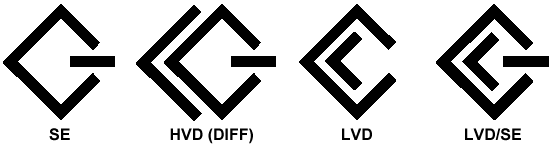
Enter the Ultra Name Game
There have been a lot of unofficial marketing names for various SCSI feature sets, so we will now look at some of the more popular ones, since these marketing names have become part of the SCSI folklore. (Hey, we admit, we market Glyph products using these names too!)(These names make you wonder, though... who would name something "Ultra", knowing it was going to be left in the dust in a matter of months? Well, yeah, there's always "X-treme"... maybe that's next... X-treme-SCSI, and then X-treme-SCSI-2, and ... Just so you know, we're not really picking on marketing folks, we like 'em... especially Glyph's marketing folks who, let's face it, are extremely cool.)
Ahem. The list of names, please (drum-roll)...
Name Std Width @ Speed SCSI SCSI-1 1 Byte data @ 5 MHz Wide SCSI-2 2 Byte data @ 5 MHz Fast SCSI-2 1 Byte data @ 10 MHz Fast-Wide SCSI-2 2 Byte data @ 10 MHz Ultra SCSI-3 1 Byte data @ 20 MHz Ultra-Wide SCSI-3 2 Byte data @ 20 MHz Ultra2* SCSI-3 1 Byte data @ 40 MHz Ultra2-Wide* SCSI-3 2 Byte data @ 40 MHz Ultra3 SCSI-3 2 Byte data @ 40 MHz x2 Ultra160 SCSI-3 2 Byte data @ 40 MHz x2 Ultra160+ SCSI-3 2 Byte data @ 40 MHz x2 Ultra320 SCSI-3 2 Byte data @ 80 MHz x2 * Unfortunately, because the narrow Ultra2 never got very popular, a lot of people refer to Ultra2-Wide as Ultra2, with the "Wide" left implied. We've been known to do this ourselves, in keeping with common industry usage. When you hear Ultra2, it actually almost always refers to Ultra2-Wide.
Glyph Sez: Here's What You Want
In practice, it only requires a few of the above SCSI flavors to cover nearly any of the recording situations where SCSI is indicated. These are the ones that Glyph has found most useful, and presently offers:
| Data Width (max) |
Data Speed (max)* |
Data Bandwidth (max) |
Signals | Devices, Cable Length (max) | |
|---|---|---|---|---|---|
| Ultra | 1 Byte | 20 MHz | 20 MB/sec | HVD SE |
HVD: 8 dev, 25 m SE: 8 dev, <=1.5 m SE: 4 dev, >1.5 m |
| Ultra2-Wide ("Ultra2") |
2 Byte | 40 MHz | 80 MB/sec | LVD SE |
LVD: 16 dev, <=12 m LVD: 2 dev, >12 m SE: 8 dev, <=1.5 m SE: 4 dev, >1.5 m |
| Ultra160 | 2 Byte | 40 MHz x2 | 160 MB/sec | LVD SE |
LVD: 16 dev, <=12 m LVD: 2 dev, >12 m SE: 8 dev, <=1.5 m SE: 4 dev, >1.5 m |
| Ultra320 | 2 Byte | 80 MHz x2 | 320 MB/sec | LVD SE |
LVD: 16 dev, <=12 m LVD: 2 dev, >12 m SE: 8 dev, <=1.5 m SE: 4 dev, >1.5 m |
The above is primarily for the hard drive mechanisms. SCSI controller cards (the PCI adapter boards that go in your Mac or PC) often have many selectable capabilities and you can tune the performance of the system based on how you configure the card. We can help you work that stuff out, of course.
Selecting the proper mating set of drives and SCSI controller for your application is something where you want to get in touch with our Application Specialists and interact a little, give some background, get some advice. We here at Glyph pride ourselves on being able to sift through all this and distill it down, but when it comes to making the best decision about your own situation, you can count on Glyph to support you directly too.
Wow!
Okay, you made it all the way to the end of this piece. We appreciate your interest in finding out what Glyph knows about SCSI. Actually, we know a lot more than what's above here, but rather than bore you completely to death, we'll give you a breather. Below this you'll find links to some great places to follow up on the info you just read. And of course, if you ever have a problem with a Glyph SCSI system, write or call one of our Tech Support folks and we'll straighten it out for you!Resources
The T10 Technical Committee